Documentation Index

Fetch the complete documentation index at: https://docs.openmemind.com/llms.txt

Use this file to discover all available pages before exploring further.

Overview

Memind retrieval is designed to assemble useful agent context, not just return similar text. Many memory systems use a simple retrieval path:
query -> vector search -> top-k memories
This works for basic recall, but it often breaks down when agents need exact terms, source context, long-running topics, time-aware memory, or higher-level understanding. Memind provides two retrieval strategies:
StrategyLatency profileBest forMain idea
SIMPLEMillisecond-level latencyLow-latency agents, chatbots, and frequent memory injection.Multi-channel retrieval and fusion without the heavier deep reasoning path.
DEEPSecond-level latencyComplex questions, high-quality retrieval, and workflows that can trade latency for completeness.Sufficiency checking, query expansion, graph/thread assist, and optional
Use SIMPLE when memory should feel instant. Use DEEP when memory should be more complete. Both strategies can retrieve across multiple memory layers:
  • Insight Tree for high-level understanding
  • Memory Items for structured facts, events, directives, playbooks, and resolutions
  • Raw Data captions for source-level context
  • Item Graph for related entities and relationships
  • Memory Threads for long-running topics and project context
  • Temporal signals for time-aware retrieval
The goal is to return context that an agent can use immediately: facts, evidence, and interpretation.

Why top-k memory retrieval breaks down

Most memory systems eventually hit the same retrieval problems.
ProblemWhat happens
Semantic-only recall misses exact termsA query about a tool name, class name, API, or project term may not retrieve the right memory.
Top-k returns fragmentsThe agent receives isolated facts but not the surrounding context.
Long-running topics get split apartRelated memories from the same project, workflow, or incident are not retrieved together.
Time-sensitive questions are weakA query like “what did we decide last week?” is treated like a normal semantic query.
High-level understanding is missingThe agent retrieves what was said, but not what the system has learned.
Retrieval is hard to debugDevelopers cannot see why a memory was returned or missed.
Memind retrieval is designed around these failure modes. It combines semantic search, keyword search, temporal signals, graph relationships, memory threads, Raw Data captions, and Insight Tree context into a retrieval result that is more useful for agents.

Layered retrieval

Memind retrieval is layered retrieval. It searches what was stored, what was understood, where it came from, how it connects, and when it happened.
LayerWhat it contributes
What was understoodInsight Tree returns stable patterns, preferences, and higher-level understanding.
What was storedMemory Items return concrete facts, events, directives, playbooks, and resolutions.
Where it came fromRaw Data captions return source-level context behind retrieved memories.
How it connectsItem Graph and Memory Threads return related entities, relationships, topics, and project context.
When it happenedTemporal signals help when the query depends on recency or time constraints.
This is the core difference:
Similarity search finds related text. Memind retrieval assembles usable agent context.

Same query, different retrieval

Consider this query:
What should I remember before writing the next Memind docs page?
A typical vector-memory system may return fragments:
- The user dislikes generic descriptions.
- The user wants implementation details.
- The user is writing Memind docs.
These facts are useful, but the agent still has to infer the broader writing strategy. SIMPLE retrieval can return a context package:
Insights
- The user prefers implementation-grounded technical writing that explains product differentiation through architecture and behavior.

Items
- The user said the overview should not sound generic.
- The user asked to explain Raw Data captions as source-level context.
- The user wanted SIMPLE and DEEP retrieval to be distinguished by latency and quality.

Captions
- Documentation planning session covering Memind 0.2.0 positioning, open-source docs structure, and how to explain the retrieval system to developers.
DEEP retrieval can investigate further when the initial context is not enough:
Initial retrieval
- Finds documentation preferences and recent retrieval-doc feedback.

Sufficiency check
- Determines whether the current context is enough to answer.

If insufficient
- Expands the query into writing style, product differentiation, retrieval strategy, and architecture explanation.
- Routes keyword-style expansions to keyword search.
- Routes semantic or hypothetical expansions to vector search.
- Explores related graph and thread context.
- Optionally reranks final evidence.
The difference is not only the number of returned memories. The difference is that Memind can assemble evidence, interpretation, source context, and related topic context together.

Retrieval strategies at a glance

Memind exposes two main retrieval strategies.
StrategyUse it whenWhat it optimizes for
SIMPLEThe query is direct and latency matters.Fast recall with strong multi-channel coverage.
DEEPThe query is complex, ambiguous, or needs broader context.Higher-quality context through reasoning-assisted retrieval.
A practical default is:
  • Start with SIMPLE for normal agent turns.
  • Use DEEP when the query needs stronger recall, better evidence, or cross-session reasoning.

SIMPLE retrieval
Simple Retrieval Flow
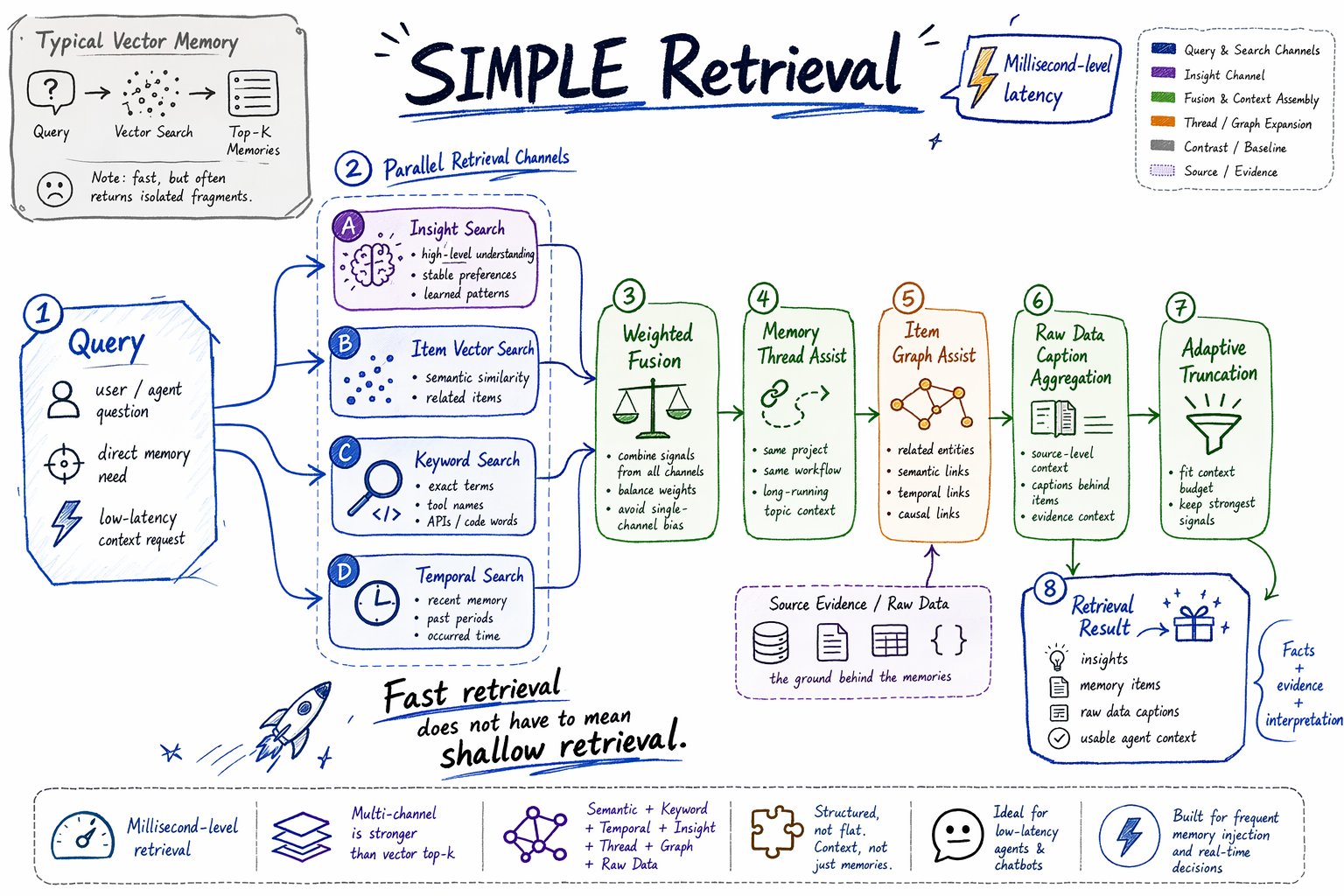
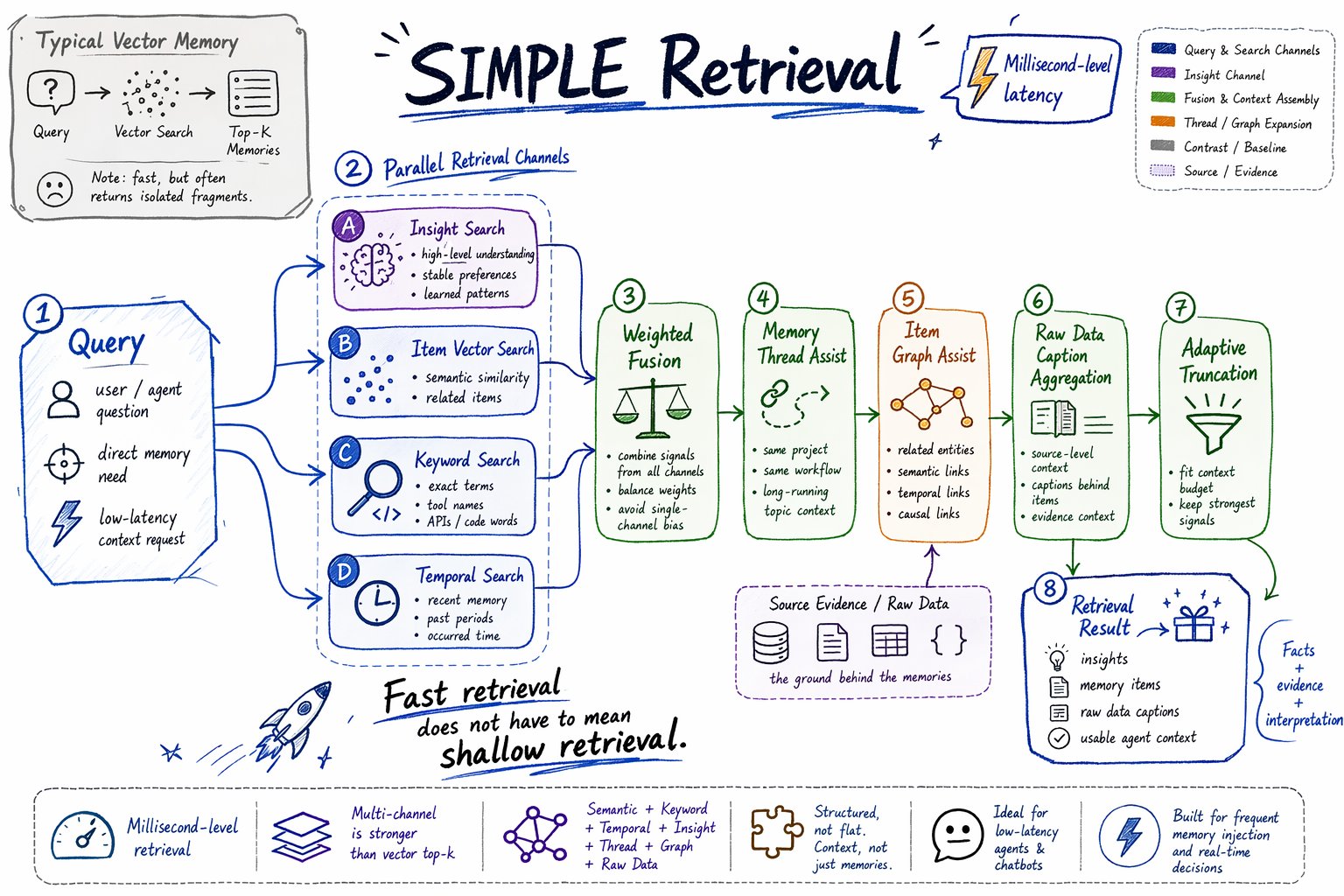
SIMPLE retrieval is the low-latency retrieval path. It is designed for millisecond-level memory recall in agents and chatbots that need to retrieve memory before many responses or tool actions. SIMPLE is not plain vector top-k. It runs multiple retrieval channels and fuses their results.

How SIMPLE works

At a high level, SIMPLE retrieval follows this flow:
Query
  -> Insight vector search
  -> Item vector search
  -> Item keyword search
  -> Temporal item search
  -> Weighted fusion
  -> Memory thread assist
  -> Graph assist
  -> Raw Data caption aggregation
  -> Adaptive truncation
  -> Retrieval result
The main channels are:
ChannelRole
Insight vector searchFinds high-level understanding from the Insight Tree.
Item vector searchFinds semantically similar memory items.
Item keyword searchFinds exact terms through keyword/BM25 search.
Temporal item searchAdds time-aware candidates when the query contains temporal intent.
Memory thread assistPulls related items from long-running topics.
Graph assistExpands from direct hits to related graph-connected memory.
After candidate retrieval, Memind merges the channels with weighted fusion, aggregates related Raw Data captions, and truncates the final result to fit the configured context budget.

Why SIMPLE is useful

SIMPLE gives agents fast memory recall without relying on a heavier reasoning path. It improves over plain vector search because each channel covers a different failure mode:
ProblemHow SIMPLE helps
Semantic search misses exact technical terms.Keyword search can match names, APIs, tools, and code terms.
Keyword search misses paraphrased meaning.Vector search can find semantically similar memory.
Top-k returns isolated facts.Graph and thread assist can add related context.
A query depends on time.Temporal retrieval can use occurred time and time constraints.
Items are too terse.Raw Data captions add source-level context.
One channel dominates results.Weighted fusion combines signals from multiple channels.
Use SIMPLE when retrieval should be fast but still memory-aware.

When to use SIMPLE

Use SIMPLE for:
  • millisecond-level memory recall
  • normal chat turns
  • low-latency agent loops
  • direct fact or preference lookup
  • retrieving recent or obvious context
  • applications where retrieval runs often
  • cases where you want strong recall without extra deep-retrieval cost
Example:
var result = memory.retrieve(
    memoryId,
    "What does this user prefer when writing technical docs?",
    RetrievalConfig.Strategy.SIMPLE
).block();

DEEP retrieval

Deep Retrieval Flow
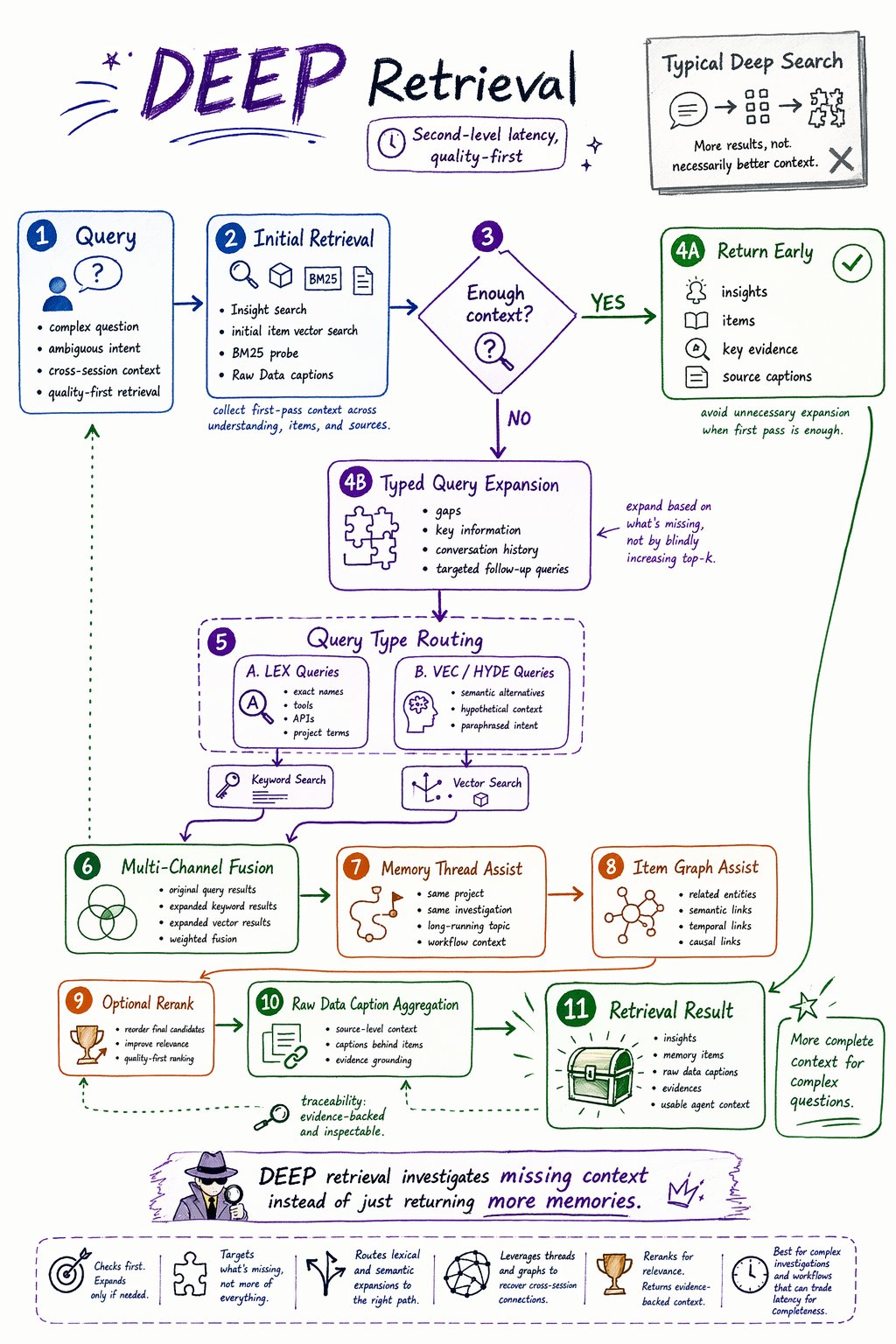
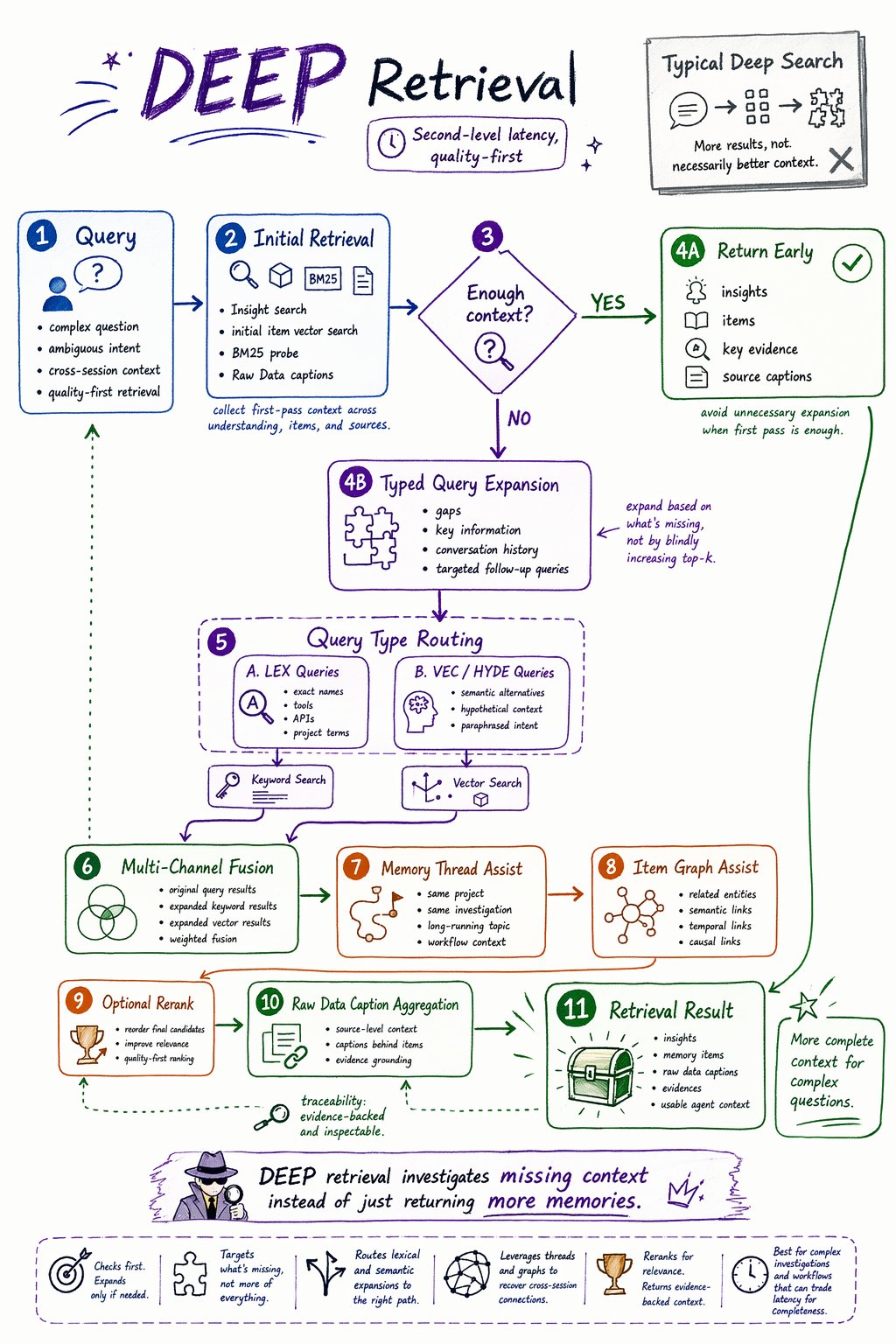
DEEP retrieval is the quality-first retrieval path. It is designed for second-level retrieval latency, where the application can spend more time to get broader evidence, better recall, and higher-quality context. DEEP is useful for harder questions: ambiguous queries, cross-session investigations, project-level questions, or cases where the agent needs stronger evidence before acting. DEEP does not simply increase top-k. It first checks whether the initial context is sufficient. If not, it expands the search intelligently.

How DEEP works

At a high level, DEEP retrieval follows this flow:
Query
  -> Insight search + initial item retrieval
  -> Sufficiency check
  -> If sufficient:
       return insights + items + evidence
  -> If insufficient:
       typed query expansion
       -> LEX queries -> keyword search
       -> VEC / HYDE queries -> vector search
       -> multi-channel fusion
       -> memory thread assist
       -> graph assist
       -> optional rerank
       -> Raw Data caption aggregation
       -> retrieval result
The key difference is the sufficiency check. Before expanding the search, Memind looks at the initial insights, items, and Raw Data captions and asks whether the current context is enough to answer the query. If it is enough, Memind can return early. If not, it continues into deeper retrieval.

Why DEEP is useful

DEEP helps when the first search pass does not provide enough context.
CapabilityWhy it matters
Sufficiency checkAvoids unnecessary expansion when the initial result is already enough.
Typed query expansionGenerates targeted follow-up queries instead of only increasing top-k.
LEX routingSends keyword-style expansions to keyword search.
VEC / HYDE routingSends semantic expansions to vector search.
Thread assistFinds related context inside long-running topics.
Graph assistExpands through relationships between memory items.
Optional rerankImproves final ordering for complex queries.
Evidence outputReturns key evidence when the initial context is sufficient.
This makes DEEP useful for retrieval quality, not just retrieval quantity.

When to use DEEP

Use DEEP for:
  • second-level retrieval where quality matters more than latency
  • ambiguous user questions
  • cross-session memory search
  • project or investigation questions
  • queries that need broader evidence
  • cases where missing context is expensive
  • tasks where retrieval quality matters more than latency
Example:
var result = memory.retrieve(
    memoryId,
    "What has changed in this project direction over the last few weeks?",
    RetrievalConfig.Strategy.DEEP
).block();

SIMPLE vs DEEP

Use this table as a practical guide.
NeedRecommended strategy
Millisecond-level memory recallSIMPLE
Low-latency chatbot responsesSIMPLE
Memory retrieval before frequent agent actionsSIMPLE
Direct user preference lookupSIMPLE
Exact technical term or tool lookupSIMPLE
Second-level retrieval is acceptableDEEP
Retrieval quality matters more than latencyDEEP
Need more complete evidenceDEEP
Ambiguous or underspecified queryDEEP
Cross-session investigationDEEP
Project-level context reconstructionDEEP
In most applications, SIMPLE is the default retrieval mode. Use DEEP selectively for harder questions.

What retrieval returns

Memind retrieval returns a structured result, not just a flat list.
OutputMeaning
insightsHigh-level understanding from the Insight Tree.
itemsStructured memory items ranked by retrieval score.
rawDataAggregated Raw Data captions behind retrieved items.
evidencesKey evidence produced by deep retrieval when available.
strategyThe retrieval strategy used.
queryThe effective query used for retrieval.
The formatted result is designed for agent context construction:
Insights
Items
Captions
Each layer has a different role:
LayerRole
InsightsProvide interpretation.
ItemsProvide concrete facts and memory units.
Raw Data captionsProvide source-level context.
A useful retrieval result should help the agent understand both what happened and what Memind has learned from it.

Retrieval traces

Memory retrieval can be difficult to debug. Memind provides retrieval traces so developers can inspect what happened during retrieval. A trace can help answer questions like:
  • Was SIMPLE or DEEP used?
  • Which retrieval channels ran?
  • Did keyword search return candidates?
  • Did temporal retrieval activate?
  • Did graph assist or memory-thread assist change the result?
  • Did DEEP trigger query expansion?
  • Was reranking applied?
  • Why did a specific item appear in the final result?
This is especially useful when retrieval feels wrong. Instead of treating memory as a black box, you can inspect the retrieval path and tune the configuration.

Configuration

Retrieval behavior can be controlled through runtime configuration. Common configuration areas include:
AreaControls
StrategyWhether to use SIMPLE or DEEP.
Tier limitsHow many insights, items, and Raw Data captions to retrieve.
Fusion scoringHow vector, keyword, temporal, graph, and thread signals are weighted.
Temporal retrievalWhether time-aware retrieval is enabled.
Graph assistWhether related graph-connected memory can be added.
Memory thread assistWhether long-running topic context can be added.
Deep retrievalSufficiency checking, query expansion, and reranking behavior.
TraceWhether retrieval traces are collected for debugging.
CacheWhether repeated retrieval requests can reuse cached results.
Start with default settings, inspect retrieval traces in Memind UI, then tune strategy, top-k limits, assist behavior, and reranking only when needed.